Highlighted Features in This Release
- NEW Workflow Overview – replaces Campaign Health Dashboard
- NEW Campaign Workflow Activities Section
- NEW Advvy Activities view
- NEW MBAs view
- Campaign Plan: Media Plan Sync – Ability to add data values into the individual flight weeks.
- Campaign MBA: Changes to MBA forms
- Campaign Workflow Logic – Ability to instantiate workflow dates in the past
- User Record Update
- Notifications UI Improvements
A new year, a new design….
This latest release brings major changes to the workflow activities and Advvy Activities section of Advvy Agency.
These new User Experience (UX) designs have been introduced to improve the whole experience to meet modern task management principles. These changes deliver:
- Increased performance and ease of tasks management, i.e view, assign and update tasks faster.
- Increased visibility of entire campaign activity by changing from a “horizontal” stage experience to a vertical one so the whole campaign /project is visible on the screen. This makes it easier to see the whole campaign together without switching between stages.
- Improved ways to view and manage campaign task due dates using drag and drop timelines.
- Consistent look and feel across the Campaign Form, the Advvy Activity List and the Workflow Overview. We have done this for a better user experience. Previously it was three different UI’s all doing the same thing.
- The ability to switch between List, Gantt and Kanban easily for workflow activities. This wasn’t possible before.
Your customer success team are here to help your teams improve their experience using Advvy.
We recommend all clients consider implementing a change management approach for this release to showcase some of the new workflow activity design changes before deploying the solution to the live production environment. Happy to help you shape the showcase to your teams!
New Workflow Overview
Workflow Overview dashboard
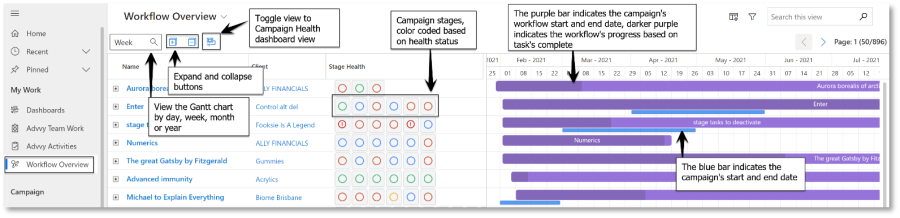
This update has replaced the Campaign Health dashboard with the Workflow Overview section and
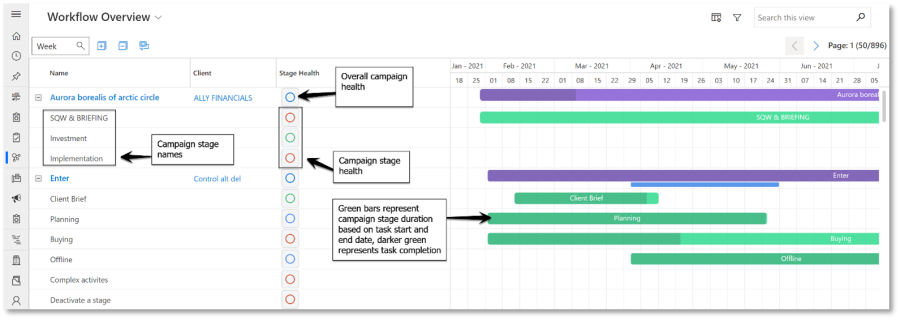
The Workflow Overview dashboard provides users with a brand-new campaign viewing and management experience. The dashboard allows users to quickly view the health status and progress of campaigns in an interactive Gantt Chart View.
Collapsed view (default view):
Expanded view:
New UX for Campaign Workflow Activities tab
Workflow Activities Section
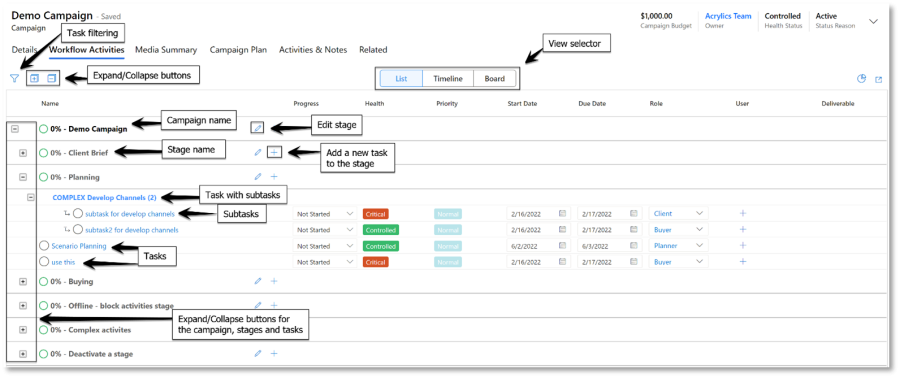
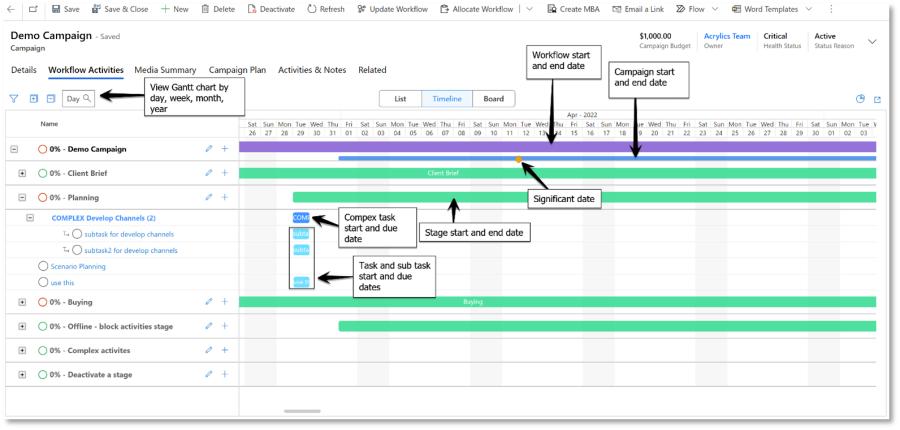
The workflow activities section within a campaign has also been enhanced as part of this update. Below is a collection of screen shots and explanations of those changes. If you have any specific questions, please reach out to your customer success manager.
List view:
Timeline view
New UX for Advvy Activities View
Advvy Activities View
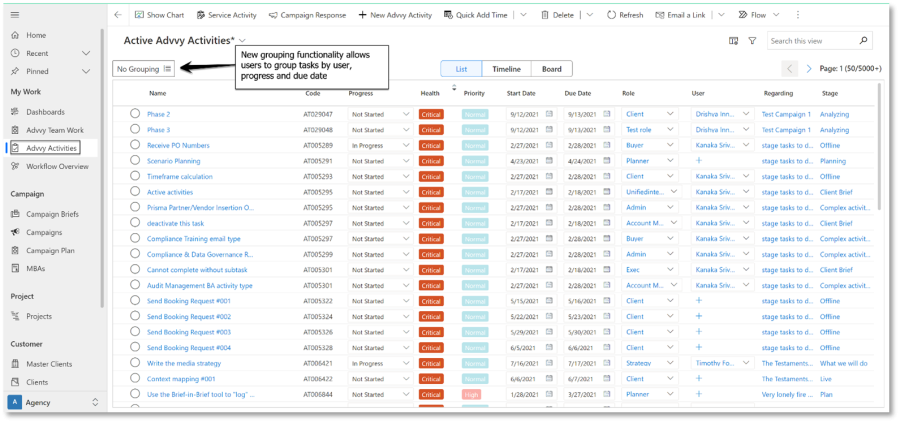
The Advvy Activities dashboard has also been enhanced with the new form layout to create uniformity across Advvy. The dashboard is similar to the Workflow Overview and Workflow Activities Section, but also includes grouping to segment the data. Grouping options include user, progress and due date.
Advvy Activities:
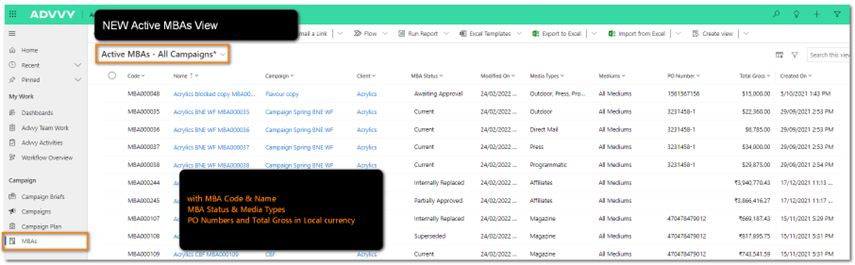
New MBAs View List
A number of new views have been added to the Campaigns menu to support the MBA function in campaigns.
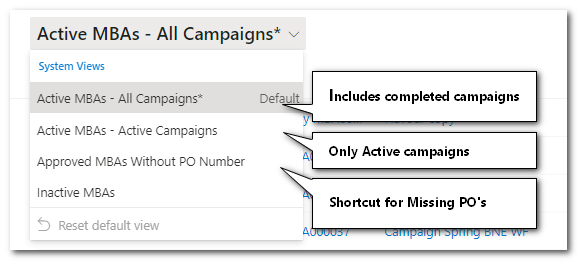
The views are a collection of MBA’s from all campaign records in Advvy. Variations of the MBAs views include:
- A view of all MBAs and their status across all Campaigns (including campaigns that have been completed)
- A view of all MBAs and their status across all current Campaigns that are Active (in progress)
- A view of all MBA’s that do not include a Purchase Order number
- A View of Inactive MBA’s
The view shows the MBA code, MBA name and status along with Purchase Order numbers and Total Gross value.
Note: a Campaign may have more than one MBA attached to it – each time the Create NEW MBA is used a new MBA is created with a new MBA number that can be tracked in this view.
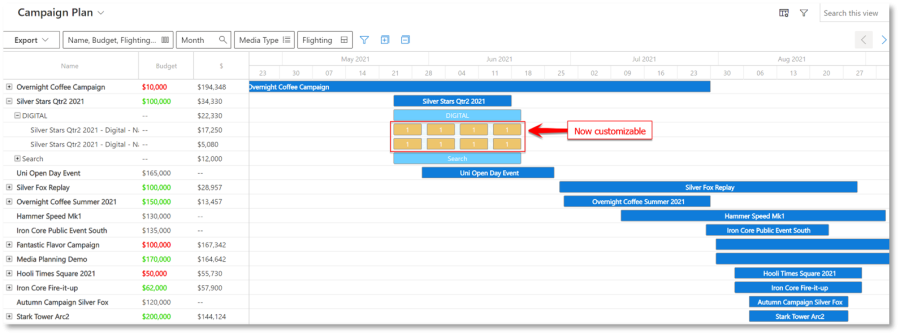
Campaign Plan: Media Plan Sync -Ability to add data values into the individual flight weeks
Users can now add individual values to synced flights in the campaign plan. This allows the user to customize the campaign plan to represent the data needed for client reporting and other needs.
Changes to MBA forms
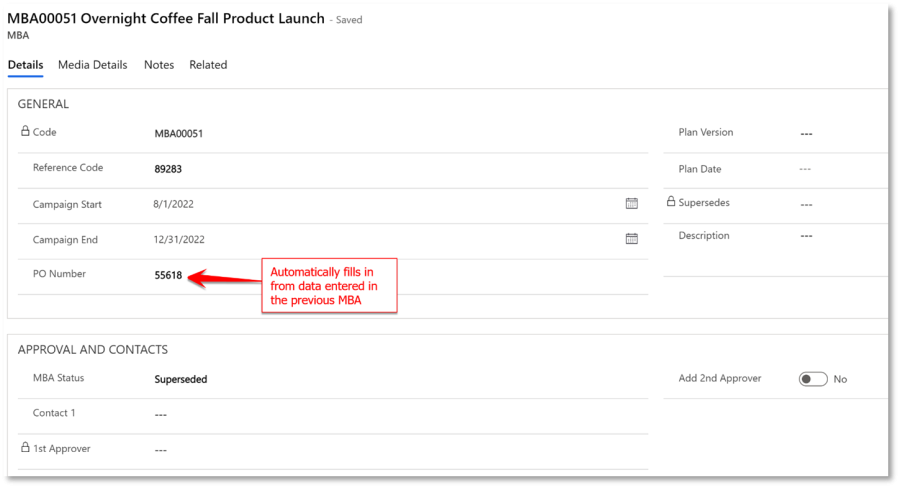
PO numbers now automatically populate the PO Number field when an MBA is superseded. Users will no longer need to enter PO numbers on new MBAs. This will reduce the change of human error when the PO number needs to be manually entered for each new MBA. It will also increase efficiency as it’s one less manual field to enter.
Image of the new MBA form:
This update also brings changes to the MBA form in the client portal. The form now includes a calculation fields making it easier for users to calculate totals from the MBA form.
(UM only) In UM’s TA platform, additional fields for NET plus GST were added. These fields were made so the MBA form can capture even more information.
Workflow Logic – Ability to instantiate workflow dates in the past
After a campaign is created, the due date calculations of each task can now fall before the start date of the campaign. Previously, tasks would not calculate before the campaign’s start date and their due date would be the same as the start date of the campaign. This change comes directly from feedback from our existing clients. The change will also make entering historic campaigns more efficient than previous versions of Advvy.
User Record Update
In a user record, under the Agency Assignments tab, the Assigned Roles box now includes a campaign column. This tells the user which roles the user has been assigned to and which campaigns those roles belong to.
This provides clear insight into the types of tasks the user regularly works on, and which campaigns those roles are a part of. Previously, the campaign was not stated in this section.
Notifications UI Improvements
Each user record in Advvy includes an “Agency Notifications” tab, which allows users to control the types of Advvy notifications received, and how they want to receive them. As an example, users can choose to be notified via email or Microsoft Teams message when a task is assigned to them.
The new update improves the UI design of the “Agency Notifications” section, providing a clearer format for users to choose which tasks they want to be notified of and by which delivery type.
*Please note the notification functionalities are only available in some environments. Please check with your Customer Success representative to discuss enabling these notifications.
Release Details
- Enhancements
| Area | ID | Title |
| Advvy Activities | 5553 | Advvy Activities: Hide fields/sections on bulk edit form |
| Campaign Plan | 4820 | Ability to add data values into the individual flight weeks. |
| Contacts | 5953 | Add new Agency User field to specify responsible agency user |
| MBA | 5573 | MBA – Ensure PO Number is populated on subsequent MBAs created that have been superseded |
| MBA | 5581 | Add MBA Total Calculation Fields |
| MBA | 5583 | UM TA Platform|MBA|Media Plan Flighting| Additional field NET plus GST |
| User Record | 5756 | User Record Update |
| User Record | 5568 | Notifications UI Improvements |
| Workflow | 5630 | Workflow: Data Upgrade to fill in new Client lookup field on existing Workflow Instances |
| Workflow | 5610 | Workflow: Capture Client on Workflow Instantiation |
| Workflow | 5732 | Workflow Logic – Ability to instantiate workflow dates in the past |
| Workflow | 5582 | Workflow: New Workflow Overview PCF |
- Bug Fixes
*List excludes internal backend Advvy development and bug fixes.
| Area | ID | Title |
| Workflow Plan | Bug | Workflow Plan – API Change |
| Campaign Plan | Bug | Campaign Plan – loading modal/gantt init error |
| Advvy Activity Form | Bug | Advvy Activity Form: Complex Activity “name” field is in wrong place when loading a current Complex Activity form |
| Advvy Activity Form | Bug | Advvy Activity Form: Complex Activity shouldn’t be allowed to select a parent activity |
| Advvy Activity Form | Bug | New Advvy Activity Form: Regarding field selection issue |
| Workflow | Bug | MWF Stage Definition Form: While creating a Stage ‘New’ ribbon button, Script error occurs |
| Workflow | Bug | MWF Activity Definition form: New form doesn’t save when creating from lookup object through the “Add Related Activity” ribbon dropdown |
| Project | Bug | While opening new project, Client field is not locked |